⚠️
Fault codes, explained
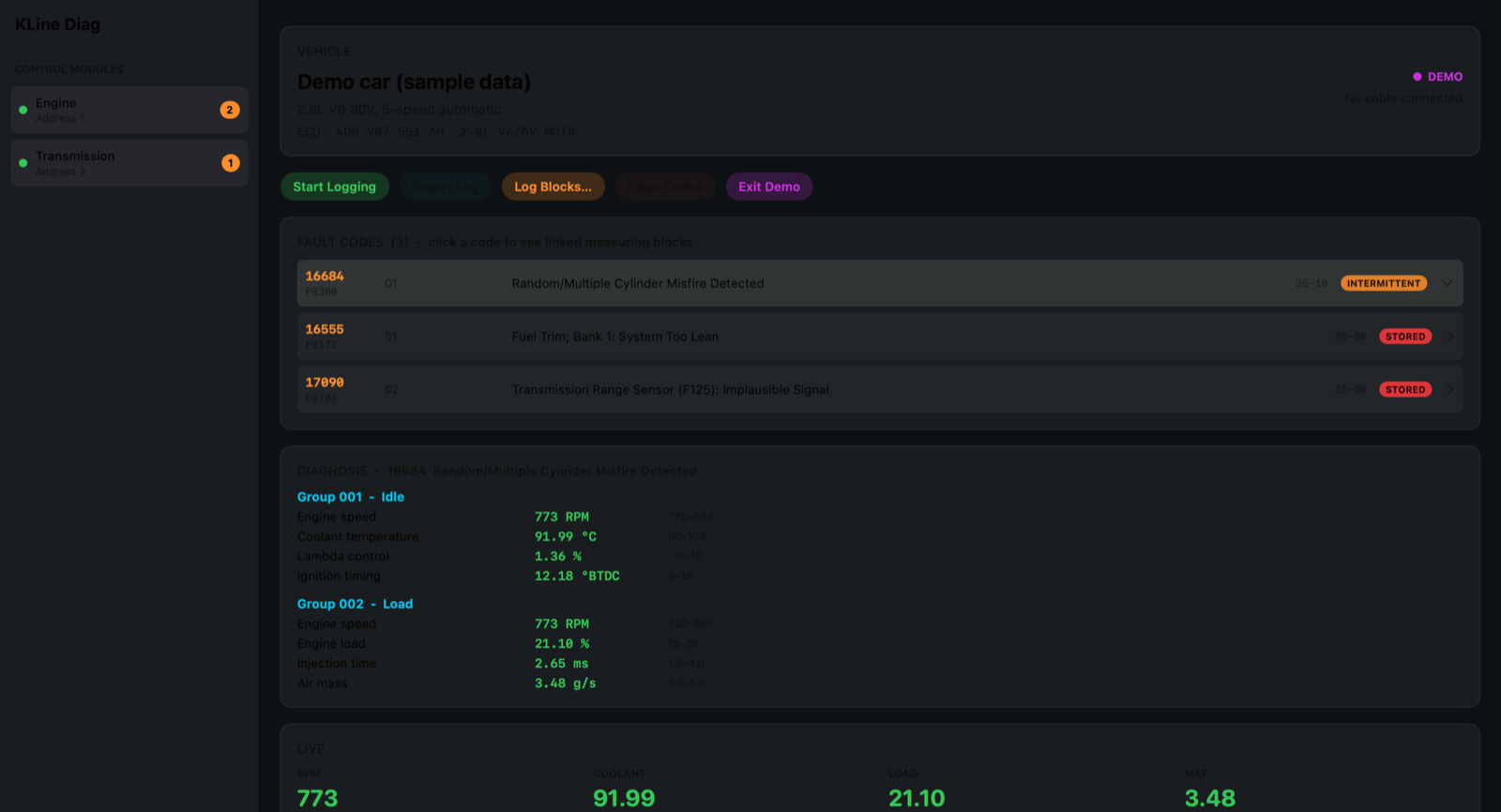
Read stored and intermittent codes from the engine and transmission, with a plain-English description, the matching OBD-II P-code, and the fault type. Clear them when the job’s done.
📈
Live data
Measuring blocks for RPM, coolant, load, air mass, timing, lambda control, fluid temperature and more, with gauges and a live graph.
📝
Log a drive
Pick the blocks you care about, hit record, and export a CSV to chase down that problem that only happens on the highway.
🔌
Just a USB cable
Works with an inexpensive FTDI-based USB KKL cable and the K-Line protocol (KW1281) that VW-group cars used before CAN, so you don’t need a Windows laptop or a dealer tool.
🤖
Bring your own AI
Optionally connect your car to an AI assistant over MCP so it can read the same codes and live data and help you diagnose. Off by default, read-only unless you allow clearing.
🔒
Private by design
Everything stays on your Mac. No account, no ads, no analytics. Nothing leaves your computer unless you switch on the AI connection yourself.